# Plagiarism Check

In **[My Account section for students](http://portal.tpu.ru/desktop/student/)** select the **Plagiarism Checker** tab ([Проверка на плагиат](http://portal.tpu.ru/desktop/student/antiplagiat)).

[![image.png](https://devdocs.tpu.ru/uploads/images/gallery/2024-12/scaled-1680-/UVzimage.png)](https://devdocs.tpu.ru/uploads/images/gallery/2024-12/UVzimage.png)

To start checking your thesis for plagiarism, click the button (Проверить документ).

[![image.png](https://devdocs.tpu.ru/uploads/images/gallery/2024-12/scaled-1680-/M4Cimage.png)](https://devdocs.tpu.ru/uploads/images/gallery/2024-12/M4Cimage.png)

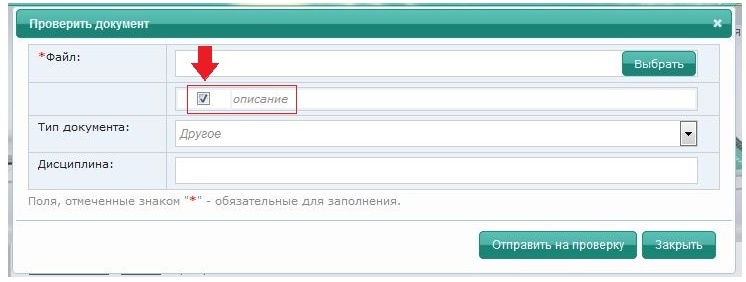
Add a file to be checked for plagiarism by clicking the **Select** button (Выбрать).

[![image.png](https://devdocs.tpu.ru/uploads/images/gallery/2024-12/scaled-1680-/mFyimage.png)](https://devdocs.tpu.ru/uploads/images/gallery/2024-12/mFyimage.png)

<p class="callout warning">Tick the **Description** box (Описание) before running a plagiarism check</p>

[![image.png](https://devdocs.tpu.ru/uploads/images/gallery/2024-12/scaled-1680-/V0Himage.png)](https://devdocs.tpu.ru/uploads/images/gallery/2024-12/V0Himage.png)

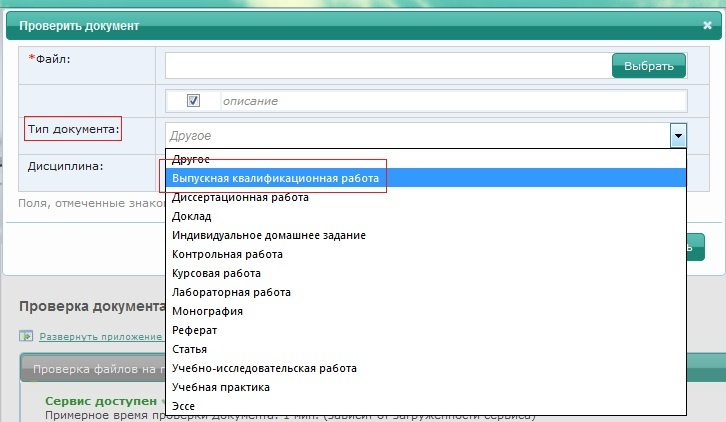
Select **Document Type** (Тип документа) – **Graduate Thesis** (Выпускная квалификационная работа).

<p class="callout warning">If you do not specify the correct type of document in the description (graduate thesis), the uploaded file will not appear in the list when you fill out an application for plagiarism check</p>

[![image.png](https://devdocs.tpu.ru/uploads/images/gallery/2024-12/scaled-1680-/3hBimage.png)](https://devdocs.tpu.ru/uploads/images/gallery/2024-12/3hBimage.png)

**Field of Study** (Дисциплина) is an optional field.

[![image.png](https://devdocs.tpu.ru/uploads/images/gallery/2024-12/scaled-1680-/dt0image.png)](https://devdocs.tpu.ru/uploads/images/gallery/2024-12/dt0image.png)
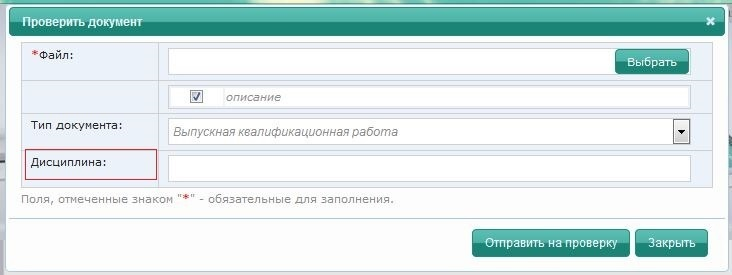
Click the **Run Check** button (Отправить на проверку).

[![image.png](https://devdocs.tpu.ru/uploads/images/gallery/2024-12/scaled-1680-/FtMimage.png)](https://devdocs.tpu.ru/uploads/images/gallery/2024-12/FtMimage.png)
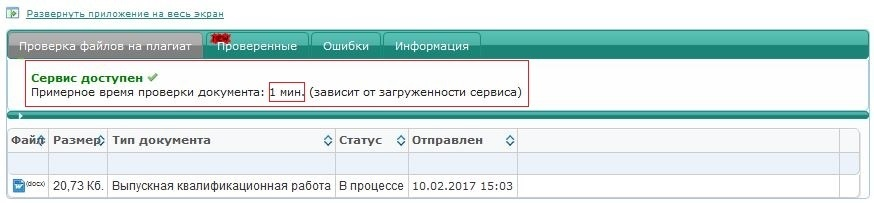
<p class="callout warning">The approximate time of the plagiarism check is displayed in the top line. To view the remaining check time and the completion time, please, refresh the page by pressing **Ctrl+F5**</p>

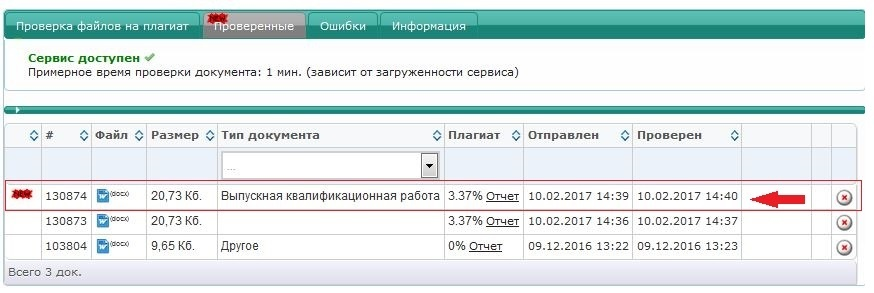
The checked file will be displayed in the Checked tab (Проверенные).

[![image.png](https://devdocs.tpu.ru/uploads/images/gallery/2024-12/scaled-1680-/vscimage.png)](https://devdocs.tpu.ru/uploads/images/gallery/2024-12/vscimage.png)
<p class="callout warning">After checking your thesis for plagiarism, go to the **Thesis Check** tab (Проверка ВКР) in (Личный кабинет) ([http://portal.tpu.ru/desktop/student/vkr)](http://portal.tpu.ru/desktop/student/vkr))</p>

[![image.png](https://devdocs.tpu.ru/uploads/images/gallery/2024-12/scaled-1680-/bhvimage.png)](https://devdocs.tpu.ru/uploads/images/gallery/2024-12/bhvimage.png)