# Plagiarism Check Guidelines


# General

Only **your own document** can be checked for plagiarism: an abstract, a term paper, a thesis, a research paper, a publication, etc.

<p class="callout warning">Any attempt to check for plagiarism someone else's file taken from open Internet sources, and attempts to bypass the system by any means will be banned, which includes blocking the user's login</p>

The size of a downloaded file should not exceed **5 MB.** The file must be short, in Latin letters, without spaces.

<p class="callout warning">Only texts should be checked. Remove images, if possible</p>

# Thesis Check Rules

A truncated file is checked for plagiarism according to the [Order No. 1 од (dated January 09, 2017) Rules of work organization to check the volume of borrowings in the thesis and placement in the TPU electronic library system (Annex 2).](https://portal.tpu.ru/f_idotpu/doc/vkr/new/vkr_reg.pdf)In order to display a plagiarism-checked file in **Thesis Check' service** (it happens automatically), put a checkmark in the **Description** field and select the document type **Graduate thesis** in the drop-down menu (including Master’s and PhD students).If you have already checked the file with a thesis status in the module **Thesis Check**, you can select the desired checked document in the drop-down menu on the right of the **Document** tab. Do not click the link on the left.

# Errors and User Blocking

<div class="columnLayout single" data-layout="single" id="bkmrk-if-a-file-check-fail"><div class="cell normal" data-type="normal"><div class="innerCell">If a file check fails with the status ***UCM Server Unavailable***, it means you have exceeded the limit of checks per day. The next check attempt will open in 24 hours since the first of the three checks. For instance, if you checked the files at 9, 10 and 11 am, the next check will be available the next day at 9 am, another one will open at 10 am, etc.</div></div></div>If a file check fails with the status ***Unexpected Internal Error**; **You cannot try again to download a document that you have failed to download the previous time**, etc.,* it means that your login has highly likely been blocked for violation of checking rules and you should:

<div class="columnLayout single" data-layout="single" id="bkmrk-change-password%C2%A0in-t"><div class="cell normal" data-type="normal"><div class="innerCell">1. [Change password ](https://user.tpu.ru/acct/login.htm)in the TPU corporate network and send a message to [support](https://help.tpu.ru/) (question category "My account, portal and all TPU sites", subcategory "AntiPlagiarism") to reset a password, request to unlock, and guarantee that you will not violate the checking rules again.
2. Do not check files after a password reset until we notify you that your login is unlocked.
3. When checking after unlocking, please strictly follow the checking rules mentioned above.

</div></div></div>

# Plagiarism Check

In **[My Account section for students](http://portal.tpu.ru/desktop/student/)** select the **Plagiarism Checker** tab ([Проверка на плагиат](http://portal.tpu.ru/desktop/student/antiplagiat)).

[![image.png](https://devdocs.tpu.ru/uploads/images/gallery/2024-12/scaled-1680-/UVzimage.png)](https://devdocs.tpu.ru/uploads/images/gallery/2024-12/UVzimage.png)

To start checking your thesis for plagiarism, click the button (Проверить документ).

[![image.png](https://devdocs.tpu.ru/uploads/images/gallery/2024-12/scaled-1680-/M4Cimage.png)](https://devdocs.tpu.ru/uploads/images/gallery/2024-12/M4Cimage.png)

Add a file to be checked for plagiarism by clicking the **Select** button (Выбрать).

[![image.png](https://devdocs.tpu.ru/uploads/images/gallery/2024-12/scaled-1680-/mFyimage.png)](https://devdocs.tpu.ru/uploads/images/gallery/2024-12/mFyimage.png)

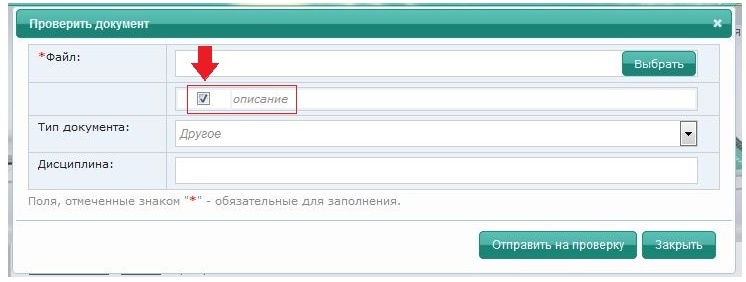
<p class="callout warning">Tick the **Description** box (Описание) before running a plagiarism check</p>

[![image.png](https://devdocs.tpu.ru/uploads/images/gallery/2024-12/scaled-1680-/V0Himage.png)](https://devdocs.tpu.ru/uploads/images/gallery/2024-12/V0Himage.png)

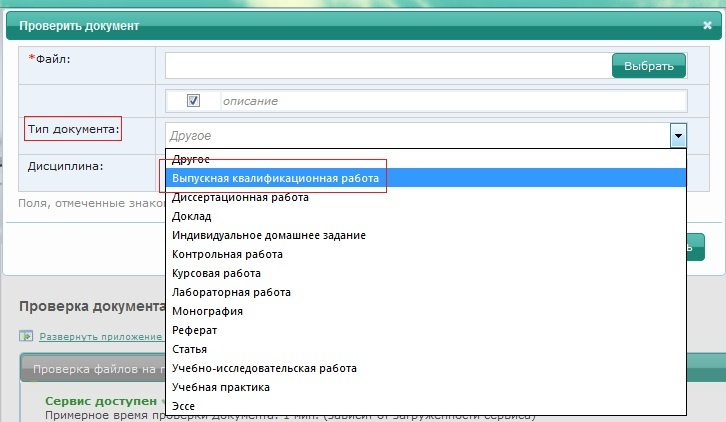
Select **Document Type** (Тип документа) – **Graduate Thesis** (Выпускная квалификационная работа).

<p class="callout warning">If you do not specify the correct type of document in the description (graduate thesis), the uploaded file will not appear in the list when you fill out an application for plagiarism check</p>

[![image.png](https://devdocs.tpu.ru/uploads/images/gallery/2024-12/scaled-1680-/3hBimage.png)](https://devdocs.tpu.ru/uploads/images/gallery/2024-12/3hBimage.png)

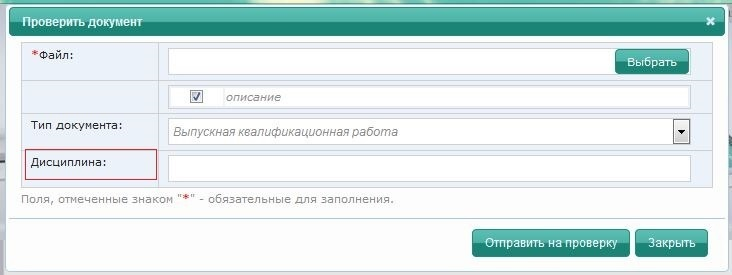
**Field of Study** (Дисциплина) is an optional field.

[![image.png](https://devdocs.tpu.ru/uploads/images/gallery/2024-12/scaled-1680-/dt0image.png)](https://devdocs.tpu.ru/uploads/images/gallery/2024-12/dt0image.png)
Click the **Run Check** button (Отправить на проверку).

[![image.png](https://devdocs.tpu.ru/uploads/images/gallery/2024-12/scaled-1680-/FtMimage.png)](https://devdocs.tpu.ru/uploads/images/gallery/2024-12/FtMimage.png)
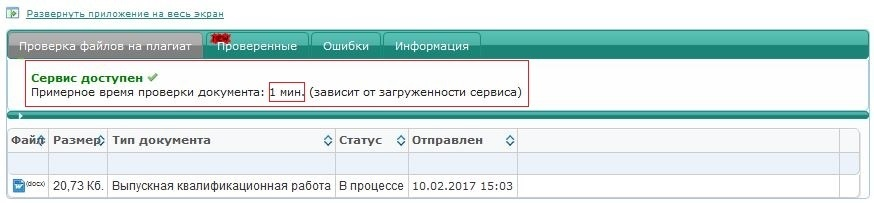
<p class="callout warning">The approximate time of the plagiarism check is displayed in the top line. To view the remaining check time and the completion time, please, refresh the page by pressing **Ctrl+F5**</p>

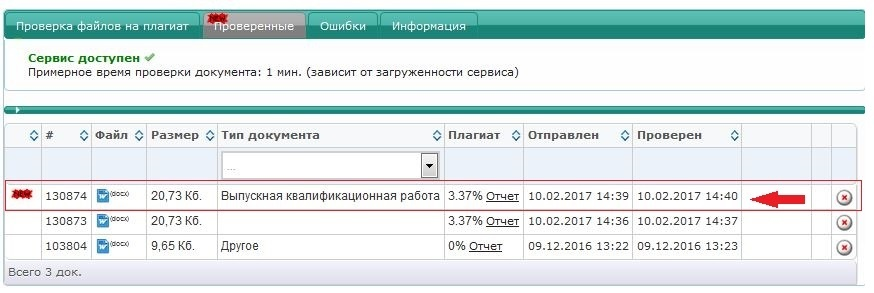
The checked file will be displayed in the Checked tab (Проверенные).

[![image.png](https://devdocs.tpu.ru/uploads/images/gallery/2024-12/scaled-1680-/vscimage.png)](https://devdocs.tpu.ru/uploads/images/gallery/2024-12/vscimage.png)
<p class="callout warning">After checking your thesis for plagiarism, go to the **Thesis Check** tab (Проверка ВКР) in (Личный кабинет) ([http://portal.tpu.ru/desktop/student/vkr)](http://portal.tpu.ru/desktop/student/vkr))</p>

[![image.png](https://devdocs.tpu.ru/uploads/images/gallery/2024-12/scaled-1680-/bhvimage.png)](https://devdocs.tpu.ru/uploads/images/gallery/2024-12/bhvimage.png)